
Credit Card
 (hosted by CURO)
This section provides reference information about processing credit card payments using the payment page hosted on the CURO gateway.
For on-line transactions the credit card schemes (Visa and Mastercard) have developed a security system to ensure only authorized payments can be processed: Verified by VISA and Mastercard SecureCode respectively. The common name for this system is 3D-Secure.
You just have to supply the basic transaction information, everything else is handled by the CURO Payments system.
Please check the Transactions for generic information applicable to all payment methods.
Credit card Payment
Register a single transaction for a credit card payment.
Note
- The hosted payment page will use the
url_callback,url_successandurl_failurewhich can be passed via this API or specified in the Site settings to provide feedback on the transaction status, and redirect the consumer back to your webshop.
Entry point: /rest/v1/curo/payment/creditcard/
REST request elements
See the Credit Card request parameters in the API reference.
| Field name | Required | Description | |
|---|---|---|---|
[request] | container | required | General container for this resource. Includes the generic request items. |
[consumer] | container | required | Consumer information for this transaction (See the generic Consumer and Shipping elements for this transaction.) |
[cartitems] | container | required | The cart items of the webshop order. (See the generic CartItems elements.) |
card_holder | required | Card holder name. Consumer data (firstname and lastname) will be used if omitted. | |
card_firstname | required | Card holder first name. Consumer data firstname will be used if omitted. | |
card_lastname | required | Card holder last name. Consumer data lastname will be used if omitted. | |
recurring | optional | Indicate this as a master/mandate transaction for recurring payments. Supported values:
| |
descriptor | optional | Optional descriptor of the transaction as it appears on the merchant or shopper statement (acquirer specific behaviour). |
REST response elements
See the Creditcard Payment response elements.
| Field name | Description | |
|---|---|---|
success | true or false indicating the result of the call. | |
[payment] | container | General container for this resource. |
code (optional) | Error code. See List of Error Codes. | |
message (optional) | Textual message indicating what went wrong in case the call was unsuccessful. | |
action | The action that needs to be undertaken (eg redirect or post). | |
external | Indicates, if TRUE, that the url is to an external website. | |
url | Complete issuer URL to which the consumer must be redirected for authentication. It is your responsibility to redirect the consumer to the url address. | |
transaction_id | Newly created transaction ID. |
ImportantThe response for a credit card transaction will always contain:
code=Transaction.Missingbecause no card holder information is available yet. This message can be safely ignored.
JSON example request
POST /rest/v1/curo/payment/creditcard/ HTTP/1.1
Authorization: Basic dXNlcm5hbWU6YXBpa2V5
Host: secure.curopayments.net
Content-type: application/json
Accept: application/json
{
    "site_id": "1234",
    "currency_id": "EUR",
    "amount": "100",
    "reference": "Reference 1",
    "description": "Description 1",
    "descriptor": "Your own description",
    "url_success": "http://www.example.com/ok.html",
    "url_pending": "http://www.example.com/pending.html",
    "url_failure": "http://www.example.com/wrong.html",
    "url_callback": "http://www.example.com/callback.html",
    "country_id": "NL",
    "language_id": "nl",
    "ip": "1.2.3.4",
    "consumer": {
        "firstname": "John",
        "lastname": "Doe",
        "email": "[email protected]",
        "address": "Nowhereroad 12",
        "city": "NonVille",
        "zipcode": "12345",
        "country_id": "NL",
        "phone": "0612345678",
        "dob": "10-07-1970",
        "gender": "m"
    },
    "cartitems": [
    {
        "quantity": 1,
        "sku": "spijkers_01",
        "name": "Spijkers",
        "price": "150",
        "vat": 21,
        "vat_inc": true,
        "type": 1
    },
    {
        "quantity": 1,
        "sku": "Discount",
        "name": "Discount total",
        "price": "-50",
        "vat": 21,
        "vat_inc": true,
        "type": 1
    }
    ]
}
Response
HTTP/1.1 200 OK
Content-Type: application/json
{
    "payment": {
        "action": "redirect",
        "external": false,
        "url": "https://secure.curopayments.net/v1/payment/creditcard.app?transaction=T16618894545",
        "transaction_id": "T16618894545",
        "testmode": 1
    },
    "success": true,
    "code": "Transaction.Missing",
    "message": "missing required parameters"
}
ImportantFor credit card payments you must always redirect the user to the
urlreceived in the response. This will be a redirect to CURO's hosted payment page for card payments.
E-Wallet or Digital Wallet Payments
CURO has support for E-Wallet payments like Apple Pay™ or Google Pay™ on devices that support one of these methods.
ImportantThe only supported methods for E-Wallets are currently VISA® and Mastercard® schemes (and sub/co-branded cards like Maestro/Dankort that allow online e-commerce payments).
Buttons for either Apple or Google will automatically appear on the page where card details can be entered.
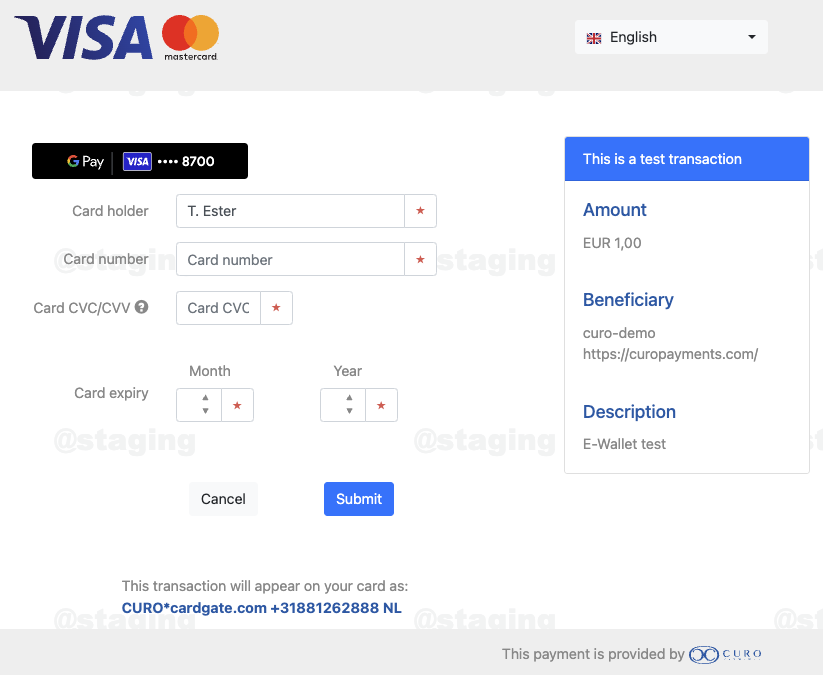
Both methods have an extensive set of additional options and possibilities that are only supported if you directly apply for a Merchant Account and integrate the options in your own webshop.
Apple Pay™ notes
Please see https://www.apple.com/apple-pay/.
Google Pay™ notes
If you want to integrate Google Pay directly on your own webshop and checkout page, see Google Pay Web developer documentation, and Google Pay Web integration checklist.
Note
- You must adhere to Google Pay APIs Acceptable Use Policy and accept the terms that Google Pay API Terms of Service defines. Your implementation should follow the Google Pay Web Brand Guidelines.
Credit card Callback
The following additional fields will be included in the call to the url_callback for credit card transactions.
| Name | Description | |
|---|---|---|
pst | Payment Sub-Type: brand of the card (lowercase). | |
secure | Indicates if 3D secure was used for the transaction. Possible values are:
| |
3ds_liable | Indicates if you (the Merchant) is liable for fraudulent chargebacks (stolen or counterfeit cards).
3ds_liable flag indicates you are not liable, the card holder can always reverse a transaction based on many other factors (claim for not receiving goods, not as expected, etc). | |
3ds_eciflag | The raw eCommerce Indicator value. Value and meaning depend on the scheme (VISA/Mastercard) used. For successfully verified 3D-Secure transactions (secure = 1) where the merchant is not liable the values are: 02 or 05. Please see https://www.verifee.com. | |
card_holder | Name of the consumer as it was given on the payment page. | |
card_number | The masked card number. | |
card_brand | The type of card that has been used:
|
Credit card Refund
The Refund operation must be done using the Transaction ID of a successfully completed transaction. The Refund operation, as its name states, consists of returning the money already collected by a Payment or a Capture transaction. The amount collected can be refunded in total or partially. You cannot refund amounts bigger than the one sent in the original transaction.
Note
- You can perform multiple refunds until you reach the total amount of the original Payment and your balance in the system is sufficient.
- A credit card refund will be sent to the bank for processing immediately and can not be cancelled.
- Refunds will be credited to the same card information as the original payment.
See the generic Refund information and request elements.
Credit card Recurring
Credit card transactions support recurring payments via entry point /rest/v1/curo/recurring/.
ImportantUsually these requests will be completed within 3 seconds, but occasionally it may take some time to get fully processed. Please allow up to
120seconds for connection and request timeouts.
Entry point: /rest/v1/curo/recurring/
REST request elements
| Field name | Description | |
|---|---|---|
[request] | container | General container for this resource (XML only). |
transaction_id | Id of a previously successful transaction ID. This is also referred to as the "Parent Transaction", "Master Transaction" or "Referenced Transaction". | |
reference | Unique merchant identification for a transaction. | |
amount | The amount payable in cents (with no decimal separator). | |
currency_id | ISO currency code. | |
description | Recurring description. For credit card this is usually not visible on the consumer statement due to the fixed Descriptor that is used by the bank. | |
ip | IP address of the consumer. |
[consumer] — container
[consumer] — containerConsumer information for this transaction. (See generic Consumer elements.)
ImportantFor Card-On-File it is advised to include as much (realtime) consumer information as possible in case the card holder disputes the charge(s).
REST response elements
| Field name | Description | |
|---|---|---|
[recurring] | container | General container for this resource. |
transaction_id | Newly created transaction ID. |
[processor] — container
[processor] — containerContainer for the processor data. The actual elements you receive depend on the context of the request!
| Field name | Description | |
|---|---|---|
BankCode | Response code of the bank. | |
BankMessage | Response message of the bank. | |
BankApprovalCode | BIC/SWIFT of the recipient. |
JSON example request
POST /rest/v1/curo/recurring/ HTTP/1.1
Authorization: Basic dXNlcm5hbWU6YXBpa2V5
Host: secure.curopayments.net
Content-type: application/json
Accept: application/json
{
    "transaction_id": T1234567890,
    "amount": 100,
    "currency_id": "EUR",
    "reference": "SDD12345-05",
    "description": "Monthly payment 12345.",
    "ip": "1.2.3.4",
}
Response
HTTP/1.1 200 OK
Content-Type: application/json
{
    "success": true
    "recurring": {
        "transaction": "T1234567890",
        "processor": {
            "BankCode": "00",
            "BankMessage": "Approved",
            "BankApprovalCode": "005946",
        },
        "transaction_code": 210,
        "transaction_id": "T1234567890",
    },
    "code": "Transaction.Success"
    "message": "The operation was successfully processed."
}
Credit card Capture
See the generic Capture information and request elements.
Credit card Cancel
See the generic Cancel information and request elements.
Updated about 2 months ago