
Callback
The specified url_callback (either dynamically for each request, or fixed in Site Settings) will automatically receive status updates for the transaction.
The default
curoprotocol will use an HTTPGETto send these arguments as form-encoded data (var=value&val2=value2&etc). This can be changed to aPOSTvia the Site configuration.
- You can only use the
httporhttpsprotocols, and the remote port must be80,8080,8888,443or8443. All other ports are blocked by our outgoing firewall!- The maximum timeout for reading the URL is 30 seconds.
- If the HTTP result is not
200, the call will be retried 5 times with increasing intervals (1, 1, 15, 60 and 1440 minutes). Not all HTTP errors will be retried.- If the HTTP result is
200, the call will NOT be retried, even if the response value is not according to the protocol.
Callback fields
Name Type Length Description transactionstring ≤ 12 This is the CURO transaction ID. siteinteger ≤ 10 Site ID for this transaction. testmodeinteger 1 Tells if the transaction was in test mode ( 1) or live mode (0).referencestring ≤ 255 Your unique reference for the transaction. All transactions with the same refwill have the same transaction ID.info(optional)string ≤ 255 Optional extra information that was submitted to the gateway for this transaction. statusstring ≤ 255 A textual status of the transaction. Options are: success,failure,pending,cancelled, ...codeinteger ≤ 3 Status code of the transaction. See Status Codes for a list of values. currencystring 3 The three letter currency symbol, for example EUR,USDorGBP.amountinteger ≤ 10 The amount of the transaction in cents. ipstring ≤ 16 The IP address of your customer (as passed to the API, or detected on the gateway). ptstring ≤ 32 The payment method which has been used to do the transaction. Possible values can be found under Available payment methods. pststring ≤ 32 The payment method sub-type for the transaction. Possible values can be found under Payment Subtypes. hashstring 32 To verify the callback we send a calculated hashvariable. See Callback Hash for more information on how this is calculated.Consumer information below will only be available if it was received when the transaction was registered, or entered on the default payment page hosted on the gateway.
| Name | Required | Description | |
|---|---|---|---|
firstname | optional | The first name of your customer. | |
lastname | optional | The last name of your customer. | |
company | optional | The company name of your customer. | |
address | optional | The address of your customer. | |
street | optional | The street of your customer. | |
housenumber | optional | The housenumber of your customer. | |
city | optional | The city of your customer. | |
zipcode | optional | The zipcode of your customer. | |
country_id | optional | The country code of your customer (2 chars). | |
phone | optional | The phone number of your customer. | |
email | optional | The email address of your customer. |
[payouts] (optional, container)
[payouts] (optional, container)Payout details if this option is enabled for the Merchant. Will contain multiple items.
Note that these payouts have a different format than the ones retrieved via Transaction details (
/rest/v1/curo/transaction/)!
| Name | Type | Description |
|---|---|---|
amount | numeric | Payout amount in cents, including optional fractions. Will be negative for fees! |
currency | string | Payout currency (3 char ISO code). |
description | string | Payout type description:fixed_fee (calculated fixed fee),fee (optional) (calculated variable fee),payout (gross payout amount),refund_fee (refund fee),refund (gross refund amount),rolling_reserve (optional) (Rolling Reserve amount),distributing (optional) (distributing amount, i.e. PayPal/Klarna). |
scheduled | date | Scheduled payout date. This is usually the same day, but some payment methods like credit card or OU have a delay. |
[processor] (optional, container)
[processor] (optional, container)Optional processor information for this transaction.
| Name | Description | |
|---|---|---|
bank_code | Name Issuer/Processor. | |
message | Message from Issuer/Processor. | |
error_code | Error code from Issuer/Processor. | |
error_info / error_message | Error info from Issuer/Processor. |
Additional fields (optional)
| Name | Description | |
|---|---|---|
error | Payment method specific error if available. | |
errordescription | Payment method specific error description if available. | |
processor_ref | Payment method specific reference code. | |
original_transaction_id | Original transaction ID in case of recurring payments. |
Upon request the fields below will also be used to return consumer account details for other payment options if that information is available.
| Name | Type Length | Description |
|---|---|---|
card_brand | The type of card used:mastercard,visa,amex,maestro,ideal.(BIC) (iDEAL bank BIC/SWIFT code),mistercash (Bancontact/Mister cash),directebanking (Sofort, formerly DIRECTebanking). | |
account_number | optional —creditcard/bancontact: masked card number of your customer.ideal: IBAN number of your customer. | |
card_holder | optional Name of the consumer as returned by the acquirer, or as entered on the payment page (Creditcard and Bancontact). | |
card_secure | optional (creditcard) Indicates if the customer used 3D secure:Y (Yes),N (No),U (Unknown),E (An error has occurred). | |
card_expiry | date | optional Expiry date YYYY-MM-DD of the consumer's card (DD will always be 01). |
card_issuer | optional Name of the card issuer. | |
card_type | optional Type of the card (depends on processor module): Credit,Debit,Mastercard Credit,Mastercard Debit,Visa Credit,Visa Debit. |
iDEAL specific fields (optional)
| Name | Type Length | Description |
|---|---|---|
consumer_name | Name of the iDEAL account holder. Usually matches account_name. | |
consumer_iban | IBAN of the iDEAL account. Usually matches account_number. | |
consumer_bic | BIC of the iDEAL account. Usually matches account_code. | |
issuer | Issuing bank code (same as BIC). | |
idealstatus | iDEAL transaction status:success,pending,cancel orfailure. |
Callback sample data
transaction = T23B08158775
pt = ideal
amount = 10000
currency = EUR
code = 200
testmode = 1
site = 1234
status = success
reference = WPT#20231128131506
ip = 1.2.3.4
payouts[0][amount] = -45
payouts[0][currency] = EUR
payouts[0][description] = fee
payouts[0][scheduled] = 2023-11-28
payouts[1][amount] = 10000
payouts[1][currency] = EUR
payouts[1][description] = payout
payouts[1][scheduled] = 2023-11-28
firstname = J.
lastname = Doe
country_id = NL
email = [email protected]
account_name = Hr E G H Küppers en/of MW M.J. Küppers
account_number = NL17RABO0213698412
account_code = RABONL2U
hash = 3b75fdce7eaa72e7deb889258a0dad91
Hash in Callback
To validate the callback argument, all requests to the url_callback will contain a hash variable.
This hash variable is a simple MD5 encoding of the following values: transaction, currency, amount, reference, code and the Shared Secret: key.
The key that is used depends on:
- The Site
Hash key, which can be set in the back-office (Sites - Callbacks). - If no Hash key is set for a Site, the
API keywill be used.
Test mode Hash
Just like when sending a request to the gateway in test mode, the text
TESTis added to the beginning of the string for test transactions.
Calculation is as follows:
MD5 over transaction + currency + amount + reference + code + keyExample calculation:
transaction=T16335624562currency=EURamount=100(in cents)reference=ORDER20160220code=200key=DEMO
MD5 of T16335624562EUR100ORDER20160220200DEMO = 159e1a5da8bf581ec75b0cb43ba6240eIn PHP:
<?php
$hashKey = 'DEMO';
// Set correct prefix for test/live transactions
if ($_REQUEST['testmode'] == '1') {
    $prefix = 'TEST';
} else {
    $prefix = '';
}
$hashVerify = md5(
    $prefix
    . $_REQUEST['transaction']
    . $_REQUEST['currency']
    . $_REQUEST['amount']
    . $_REQUEST['reference']
    . $_REQUEST['code']
    . $hashKey
);

if ($hashVerify == $_REQUEST['hash']) {
    // Request is OK
    // We should check currency, amount and status in our own system using $_REQUEST['reference'] here

    // Respond with the expected result so the gateway will know the callback was successful
    exit($_REQUEST['transaction'] . '.' . $_REQUEST['code']);
} else {
    // Transaction not OK!
    mail('[email protected]', 'Hash verification error!', print_r($_REQUEST, true));

    // Indicate a problem by sending an unexpected response
    exit('ERROR');
}
Callback Response
The gateway expects a response containing the CURO transaction ID, a dot (.) and the code. For example:
T1234567890.200In this example, T1234567890 is the transaction ID and 200 is the code.
For a failed transaction the response should be:
T1234567890.300T1234567890 is the transaction ID and 300 is the code.
To test callbacks you can use the simulator.
When there is a problem handling the callback, or the received data is unexpected, it is advisable to respond with a textual error giving some indication of what happened. This will greatly improve tracing back errors when they occur.
Transactions that have an unexpected callback response can be filtered out in the back-office using the "Callback OK" field, and returning a non-expected response will trigger a callback error report in our system which can be e-mailed to a given address automatically.
Important Notes on Callback
When processing the callback, please be aware of the following:
Multiple Callbacks
Depending on the payment type, it is possible that a callback is sent by our gateway more than once for the same status code. Although this happens rarely, it would be unwelcome to process this callback as another transaction.
Because every callback includes your unique reference, you should always check the transaction status on your side to see if the transaction has already been processed. If you receive another callback with the same reference and same status code, you can ignore this callback.
It is possible multiple CURO transaction IDs are linked to the same
reference. This will occur if you specified a notification e-mail must be sent to the consumer for failed transactions, or if you use the Mail Link option in the back-office.Depending on the status of the transaction at the acquirer, it might be necessary to create a new transaction so the consumer can retry the payment.
Callback Order
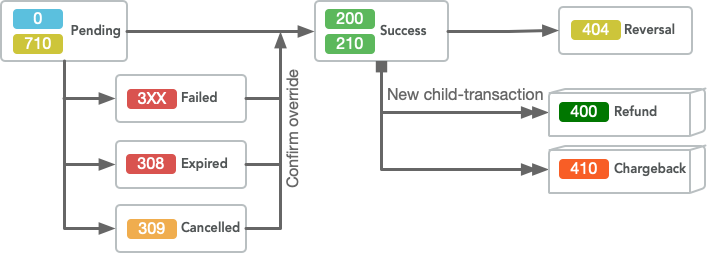
It is possible that the system sends a code=200 ('Transaction successful') first and a code=300 ('Transaction unsuccessful') after that. In this case, the code=200 is always final. You can be assured that the transaction has been processed successfully when you receive a code=200.
The typical flow of the possible status-codes is shown in the diagram below:
NB: Status codes
4XX('Refund', 'Chargeback', etc.) can be sent after the transaction was completed. This will depend on the payment type.For example Directdebit, Giropay and OU can send code
200first and code410or404later. The reason is that a bank might not be able to collect the money; this can also happen after a few days.If there are technical issues or delays with a payment processor, it is also possible a
code=3XXnotification is received first, while the transaction was in fact processed successfully. In this case when the funds are received on our account (usually one business day later) the status code will be updated to200and another callback notification will be sent.
Originating IP address
Due to a possible DDoS vulnerability we do not communicate these addresses on this public page. Please contact us for the originating IP addresses if you need this information.
Refund Callback
By default there will be no callbacks for Refunds, as these are initiated either manually in the Back-Office or through an API call. Refund callbacks can be enabled upon request for your account.
Refunds will contain the same reference as the original transaction, and link back to that transaction in the parent_transaction_id.
Example callback details (sent as HTTP GET/POST fields):
transaction = T23B08137740
pt = idealpro
amount = -3800
currency = EUR
code = 400
testmode = 1
site = 1234
status = success
reference = O1700665369NXKL079
parent_transaction_id = T23B08136233
ip = 1.2.3.4
book_date = 2023-06-13
payouts[0][amount] = -35
payouts[0][currency] = EUR
payouts[0][description] = refund_fee
payouts[0][scheduled] = 2023-06-12
payouts[1][amount] = -3800
payouts[1][currency] = EUR
payouts[1][description] = refund
payouts[1][scheduled] = 2023-06-12
firstname = J.
lastname = Doe
address = Obrechtstraat 21
street = Obrechtstraat
housenumber = 21
city = OSS
state = NB
zipcode = 5344 AT
country_id = US
phone = 123456789
email = [email protected]
account_name = Hr E G H Küppers en/of MW M.J. Küppers
account_number = NL17RABO0213698412
account_code = RABONL2U
hash = d66d4250f971d13c6dca358f7606c244
PHP example callback script
<?php
/**
 * Sample Callback Script (CURO Protocol)
 *
 * Handle Callback notification request and update local order status.
 */

// This static hash key must be the same as the setting for the site in the backoffice!
$hashKey = 'DEMO';

// Simple sanity check before we do actual work
if (
    empty($_REQUEST['transaction'])
    || empty($_REQUEST['currency'])
    || !isset($_REQUEST['amount'])    // Might be 0
    || empty($_REQUEST['reference'])
    || !isset($_REQUEST['code'])        // Can be 0
    || empty($_REQUEST['hash'])
) {
    die("Invalid request");
}

// Set correct prefix for test/live transactions
if ($_REQUEST['testmode'] == '1') {
    $prefix = 'TEST';
} else {
    $prefix = '';
}
$hashVerify = md5(
    $prefix
    . $_REQUEST['transaction']
    . $_REQUEST['currency']
    . $_REQUEST['amount']
    . $_REQUEST['reference']
    . $_REQUEST['code']
    . $hashKey
);

if ($hashVerify !== $_REQUEST['hash']) {
    // Hash not OK! make sure we have the same $hashKey here and in CURO settings.
    mail('[email protected]', 'Hash verification error!', print_r($_REQUEST, 1));

    // Indicate a problem by sending an unexpected response
    exit('ERROR: invalid hash');
}

// Find the local order by original 'reference' (which will be the same also for chargebacks)
$localOrder = pseudoQuery("SELECT * FROM `order` WHERE `reference`='%s'", $_REQUEST['reference']);
if (empty($localOrder)) {
    exit('ERROR: order not found in webshop?');
}

// Some extra sanity checks
if (round($localOrder['amount'] * 100) !== intval($_REQUEST['amount'])) {
    // Invalid amount! someone is tricking us?
    if ($_REQUEST['code'] >= 400 && $_REQUEST['code'] < 500) {
        // Refunds and chargebacks are ok
    } elseif ($localOrder['currency'] !== $_REQUEST['currency']) {
        // This might be okay if there was a currency conversion for some payment methods.
    } else {
        die("ERROR: Amount mismatch!");
    }
}

$currentStatus = $localOrder['order_status'];
$localStatus = '';
switch (true) {
    case $_REQUEST['code'] == 0: // Pending
        if ($currentStatus == 'completed') {
            // Ignore pending if the transaction was already completed
        } else {
            $localStatus = 'pending';
        }
        break;

    case $_REQUEST['code'] >= 200 && $_REQUEST['code'] < 300:
        // Success status can always be received, even after Expired/Cancel!
        $localStatus = 'completed';
        break;

    case $_REQUEST['code'] == 308: // Expired
        if ($currentStatus == 'completed') {
            // Ignore if the transaction was already completed
        } else {
            $localStatus = 'expired';
            // Send reminder to customer to complete the payment for expired transactions
            mail(
                $localOrder['consumer_email'],
                "Unfinished order",
                "You have an unfinished order!" . PHP_EOL
                . "Please use the link below to complete the payment, or contact us if you have a problem completing the payment."
                . "<a href='link_to_payment'>Retry payment</a>"
            );
        }
        break;

    case $_REQUEST['code'] == 309: // Cancel
        if ($currentStatus == 'completed') {
            // Ignore if the transaction was already completed
        } else {
            $localStatus = 'cancel';
        }
        break;

    case $_REQUEST['code'] >= 300 && $_REQUEST['code'] < 400:
        // Failures
        if ($currentStatus == 'completed') {
            // Ignore if the transaction was already completed
        } else {
            $localStatus = 'cancel';
        }
        break;

    case $_REQUEST['code'] == 404:
        // Reversal (amount never received) can be received after any other code!
        $localStatus = 'reverted';
        if ($currentStatus == 'completed') {
            // Revert the transaction and get it back from the consumer if possible
        }
        break;

    case $_REQUEST['code'] == 410:
        // Chargeback can be received after any other code
        $localStatus = 'chargeback';
        if ($currentStatus == 'completed') {
            // Revert the transaction and get it back from the consumer if possible
        }
        break;

    case $_REQUEST['code'] >= 400 && $_REQUEST['code'] < 500:
        // Refund or other reversals
        $localStatus = 'refund';
        break;

    case $_REQUEST['code'] == 701: // Waiting for payment
        if ($currentStatus == 'completed') {
            // Ignore this
        } else {
            $localStatus = 'waiting';
        }
        break;

    default:
        // Unhandled or ignored status code
        break;
}

if ($localStatus != $currentStatus) {
    // Update local status
    pseudoQuery(
        "UPDATE `order` SET `status`='%s' WHERE `id`='{$localOrder['id']}'",
        $localStatus
    );
}

// Tell CURO we processed the request
echo $_REQUEST['transaction'] . '.' . $_REQUEST['code'];

//*** demo helper function: this should be your real webshop query function ***
function pseudoQuery($query, $args)
{
    return (
        strtok($query, ' ') == 'SELECT'
        ? [ // Return a fake order record
            'id' => 123,
            'amount' => 1.25,
            'currency' => 'EUR',
            'description' => 'Test',
            'consumer_email' => '[email protected]',
            'order_status' => 'Pending',
        ]
        : true
    );
}
The hash verification logic is shown in the Hash in Callback section above.
Updated 7 days ago